How to Console.log in Laravel

Hi there 👋🏾. I'm a software engineer that enjoys building stuff and talking about them. I also tinker a bit with hardware and robotics using Arduino and ROS.
Node.js comes with a console that allows developers to log data using console.log. This is often used for debugging. console.log is often used because it offers a quick way of inspecting data. Laravel does not come with a console where logs can be written to. To see logged data, one has to inspect the laravel.log file located in the storage folder.
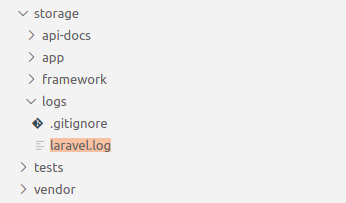
To make log inspection more convenient, we have to feed data from laravel.log to a terminal.
How to See Logged Data in a Terminal
To see logged data, open up a terminal and run
tail -f storage/logs/laravel.log
This should display the last lines in the laravel.log file. The terminal updates in realtime with new logs.
How to Log Data
To log some data and see it in the terminal, run this in a controller
# import the Log Facade
use Illuminate\Support\Facades\Log;


Log::debug('Reached this point');
This should give something similar to
[2021-03-22 06:57:57] local.DEBUG: Reached this point
You can also log arrays and objects
[2021-03-22 07:00:19] local.DEBUG: array (
  'bananas' => 5,
  'apples' => 2,
  'oranges' => 8,
)
